
The TCL99 app is offered through a "Download to Win" banner on the official site, with Google Play and App Store badges and a Download App Now button - this is the only safe place to get it. Players who prefer not to install anything get the same casino in a mobile browser on iPhone and Android: identical pokies, the AUD cashier with deposits from AUD 10 and withdrawals from AUD 30, the welcome bonus of 100% up to AUD 500 + 200 free spins and live chat in the bottom menu. Both options use one account and one balance, and the site can be added to the home screen for one-tap access in under a minute.
This page explains how to download the TCL99 app safely, how to set up the browser version as an app-style shortcut on iOS and Android, what works on mobile, how payments and bonuses behave on a phone, and how to keep the account secure when playing on the go.
| Feature | TCL99 on mobile |
|---|---|
| App download | Download App Now banner on the official site with Google Play and App Store badges |
| Browser version | Full site in Safari, Chrome, Firefox and other modern browsers |
| Home screen shortcut | Available on iOS and Android |
| Account | Same login on app, browser and desktop |
| Currency | AUD |
| Deposits and withdrawals | Full cashier - deposits from AUD 10, withdrawals from AUD 30 |
| Games | Slot, Crash, Fast Game, Live, Sport, Booongo, Aristova |
| Bonuses | Full Promotion section, including the welcome bonus and free credits |
| Notifications | Optional bonus notifications |
| Navigation | Bottom menu - Home, History, Promotion, Live Chat, Setting |
| Support | Live chat on every screen |
Is there a TCL99 app for Android and iOS?
TCL99 promotes its app directly on the site. The banner at the bottom of the lobby carries the TCL99 logo, Google Play and App Store badges, the headline "Download to Win!" and a red Download App Now button. The download starts from that button rather than from a store search, so the official site is the reference point for the correct file or link.
Real-money casino apps are often unavailable in the Australian sections of Google Play and the App Store, because online casino services are not licensed domestically. For that reason, searching the store for "TCL99" may return unrelated apps or copies. Using the Download App Now button on the official site, or a link provided by TCL99 live chat, is the reliable way to get the genuine app.
Downloading on Android
On Android, an app installed outside Google Play is usually delivered as an APK file. The phone asks for permission to install it, and that permission should only be granted for the file from the official site.
- Open the official TCL99 site in Chrome on your Android phone.
- Scroll the lobby to the Download to Win banner and tap Download App Now.
- Confirm the download when Chrome asks.
- If Android blocks the installation, allow installs from Chrome for this file only.
- Open the installed app and log in with your mobile number in the 61 format and your password.
- Turn the "install unknown apps" permission for Chrome back off after installation.
An APK file sent through Telegram, WhatsApp, Facebook groups or unfamiliar websites should never be installed, even if it carries the TCL99 name. Fake casino apps are a common way to collect login details and payment information.
Downloading on iPhone
On iOS, apps can only be installed through the App Store or approved distribution methods. If the Download App Now button leads to an App Store page, install it from there as usual. If the app is not available for your region, the browser version with a home screen shortcut gives the same access without an installation.
How to add TCL99 to your home screen
The browser version of TCL99 can be pinned to the home screen with an icon, so it opens like an app. This option works on any recent iPhone or Android phone and updates automatically whenever the site changes.
iPhone and iPad (Safari)
Safari is the browser that supports home screen shortcuts on iOS most reliably. The steps take less than a minute.
- Open the official TCL99 site in Safari.
- Tap the Share icon - the square with an arrow pointing up.
- Scroll down and tap Add to Home Screen.
- Keep the name "TCL99" or type your own label, then tap Add.
- Open TCL99 from the new icon and log in.
Android (Chrome)
Chrome on Android adds the site as a home screen icon through its menu. The shortcut opens TCL99 in a separate window without the address bar.
- Open the official TCL99 site in Chrome.
- Tap the three-dot menu in the top-right corner.
- Choose Add to Home screen or Install app, depending on the Chrome version.
- Confirm the name and tap Add.
- Launch TCL99 from the icon and sign in.
A home screen shortcut stores no files on the phone beyond the icon and normal browser data, so it takes almost no space and needs no manual updates.
TCL99 app vs mobile browser
Both options lead to the same account and balance. The choice depends mostly on whether you want push notifications and a dedicated icon, or prefer to avoid installing files.
| Criterion | TCL99 app | Mobile browser + shortcut |
|---|---|---|
| Installation | Through Download App Now on the official site | Not required |
| Storage space | Needs space for the app | Almost none |
| Updates | May require a new version | Automatic |
| Notifications | App notifications | Browser notifications, if allowed |
| Security risk | Only safe from the official source | Low when the official address is used |
| Games, bonuses and cashier | Full access | Full access |
For players who switch between devices often, the browser version is the simpler choice. For those who play mainly on one phone and want bonus alerts, the app from the official banner is convenient.
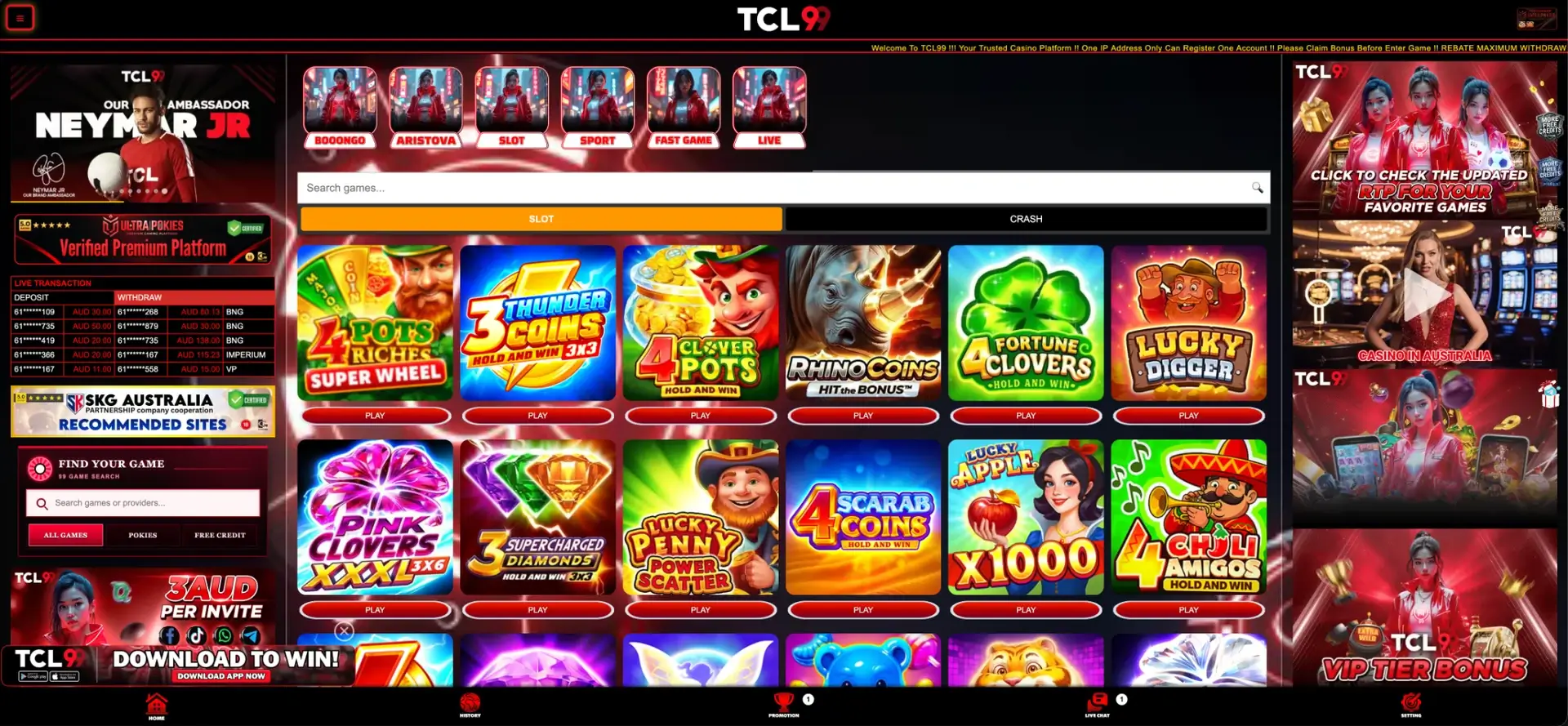
What works in the TCL99 app and mobile version
The mobile layout keeps every section of the desktop site, with the side columns moved under the game grid and the bottom menu fixed to the screen.
- Lobby: Booongo, Aristova, Slot, Sport, Fast Game and Live shortcut tiles, the search bar and the Slot and Crash tabs.
- Pokies: the full Hold and Win catalogue, including Coin Strike XXL, 4 Pots Riches, Lucky Penny Power Scatter and DJ Tiger x1000.
- Filters: All Games, Pokies and Free Credit in the Find Your Game block.
- Promotions: welcome bonus, free credits, Booongo daily free spins, rebates, ranking bonuses and rewards.
- Cashier: balance in AUD with Deposit, Withdraw and Refresh.
- History: deposits, withdrawals and bonus claims.
- Referral panel: sharing through Facebook, TikTok, WhatsApp and Telegram, with Downline and Copy Link.
- Live chat: available from the bottom menu with an unread message counter.
Hold and Win pokies suit phone screens well: most use compact 3x3, 3x5 or 5x4 grids with large symbols, and the respin features run automatically without extra taps.
Mobile payments and withdrawals in AUD
The cashier on mobile has the same limits as on desktop, and all amounts are in Australian dollars. The minimum deposit and withdrawal are printed under the balance, so they are always in view when opening the cashier.
| Parameter | Mobile app and browser |
|---|---|
| Currency | AUD |
| Minimum deposit | AUD 10 |
| Minimum withdrawal | AUD 30 |
| Rebate withdrawal cap | AUD 888 |
| Payout recipient | Bank account in the registered full name |
| Transaction records | History section |
On a phone, it is easy to open a game straight after a deposit, but the TCL99 house rules ask players to claim the bonus first. The correct order on mobile is the same as on desktop: deposit, open Promotion, claim the offer, then launch the game.
Security on the TCL99 app
The app and browser version use the same login and SMS-confirmed account, so security depends mainly on where the app comes from and how the phone is protected.
- Install the TCL99 app only through the Download App Now button on the official site or a link from live chat.
- Lock the phone with a PIN, fingerprint or Face ID, since the app keeps the session open.
- Do not share SMS codes from registration or password recovery.
- Keep the phone's operating system updated.
- Log out if the phone is used by other people.
If the account shows transactions you do not recognise in the History section, change the password and contact live chat immediately.
Account verification on mobile
The phone number is confirmed by SMS at registration, so the first verification step already happens on mobile. When a withdrawal is requested, the payment team compares the registered full name with the receiving bank account. If documents are requested, a photo of an Australian driver licence or passport and a recent bank statement can be sent directly from the phone through live chat, following support's instructions.
Tips for Australian players using TCL99 on mobile
A few habits make mobile play smoother and help avoid problems with bonuses and data use.
- Store your number in the 61 format for quick login.
- Use Wi-Fi for Live games, which use more data than pokies.
- Tap Refresh under the balance after a claim or a withdrawal request instead of reloading the page.
- Check the Free Credit filter to find games that accept free credit balances.
- Accept bonus notifications only if you want alerts about new promotions.
- Remember the one-account-per-IP rule when playing on a shared home network.
Players who set a daily budget can keep it in the phone's notes or a banking app alert, since several TCL99 promotions are built around daily deposits.
FAQ about the TCL99 app
Answers to common questions about downloading and using TCL99 on Android and iPhone in Australia.
How do I download the TCL99 app?
Open the official TCL99 site, find the Download to Win banner and tap Download App Now. Do not download TCL99 files from social media, messaging groups or other websites.
Is the TCL99 app on Google Play or the App Store?
The site banner shows Google Play and App Store badges, but real-money casino apps are often unavailable in Australian store sections. Use the Download App Now button on the official site rather than searching the store.
Can I play TCL99 without downloading the app?
Yes. The full casino runs in mobile browsers on iPhone and Android, and the site can be added to the home screen for app-style access.
Does the TCL99 app use a separate account?
No. The app, mobile browser and desktop use the same login, balance, bonuses and transaction history.
Can I claim the TCL99 welcome bonus in the app?
Yes. The welcome bonus of 100% up to AUD 500 + 200 free spins and all other promotions are available in the Promotion section on mobile.
Can I withdraw money through the TCL99 app?
Yes. The Withdraw button is in the account panel on mobile, with a minimum withdrawal of AUD 30 to a bank account in the registered name.